Crews scheduled.
Jobs done.
Money you can see.
Settles runs the whole operation: schedule the crews, dispatch the work, track hours and photo proof, invoice the customer, and see the profit at the end of it. From $79 a month, plus $4.95 per employee.
Or look around a real workspace with no signup, or call 780-966-2120. From $79 a month in Canadian dollars, plus $4.95 per employee.
Receivables
$5,444.25
Overdue
$5,213.25
Collected, 30 days
$3,118.50
Jobs open
42
Driveway snow clearing
4808 Terwillegar Blvd · Richard Penner
Invoice #0027
Paid by card
Live from the demo workspace, refreshed hourly. Open it yourself below.
Why crews switch
Four things that cost you money every week
None of this is a software problem until you are running more than one crew. Then it is the whole job.
The problem
The schedule lives in your head and a group chat
Jobs get texted out, changes get missed, and someone drives across town for a visit that moved.
With Settles
One schedule the whole crew sees. Change it once and it lands on their phones.
The problem
Hours are guessed at the end of the week
Crews text their times, you round up to be fair, and payroll costs you more than the job made.
With Settles
Crews clock in on their phone. You approve the real hours and see what each person is owed.
The problem
Invoices go out late, and some never go out at all
The work is done but the billing waits for a quiet evening, so the money arrives a month after the job.
With Settles
Finished jobs become invoices automatically. Clients tap a link and pay by card.
The problem
You find out in the spring whether winter made money
Revenue, wages and fuel sit in different places, so profit is a feeling rather than a number.
With Settles
A monthly profit number built from completed jobs and approved hours, not a spreadsheet.

And the bill for all of it should not double just because you hired five people for the winter.
Settles is from $79 a month in Canadian dollars plus $4.95 per employee. Most of this category charges $40 or more for every person you add, in US dollars.
One more crew member
8× cheaper
Hiring one more person costs $4.95 a month here. On Jobber the same person is $40.39. The full bills, base fees and all, are below.
Settles
$2,201
a year · $183/mo
Pro $129 + $4.95 each, owner free
Jobber
$4,679
a year · $390/mo
Cheaper of Grow and Plus, annual
Housecall Pro
$10,010
a year · $834/mo
Max annual, plus US$75 past 8
At 12 crew that is $2,478 a year less than the cheaper of the two, and $7,809 less than the dearer.
Every figure includes that vendor's own base fee, not just their per-seat rate. Jobber is whichever of Grow and Plus is cheaper at that crew size, since Plus includes fifteen users; Housecall Pro is Max, with eight included. Both on annual prepay, converted from US dollars at 1 USD = 1.3926 CAD, taken from their own published pricing pages and dated 24 August 2026. Check them before you decide.
One job, from the kitchen table to the bank
The same job as it moves through the product. Click a step. Every screen is the real thing.
Sunday night
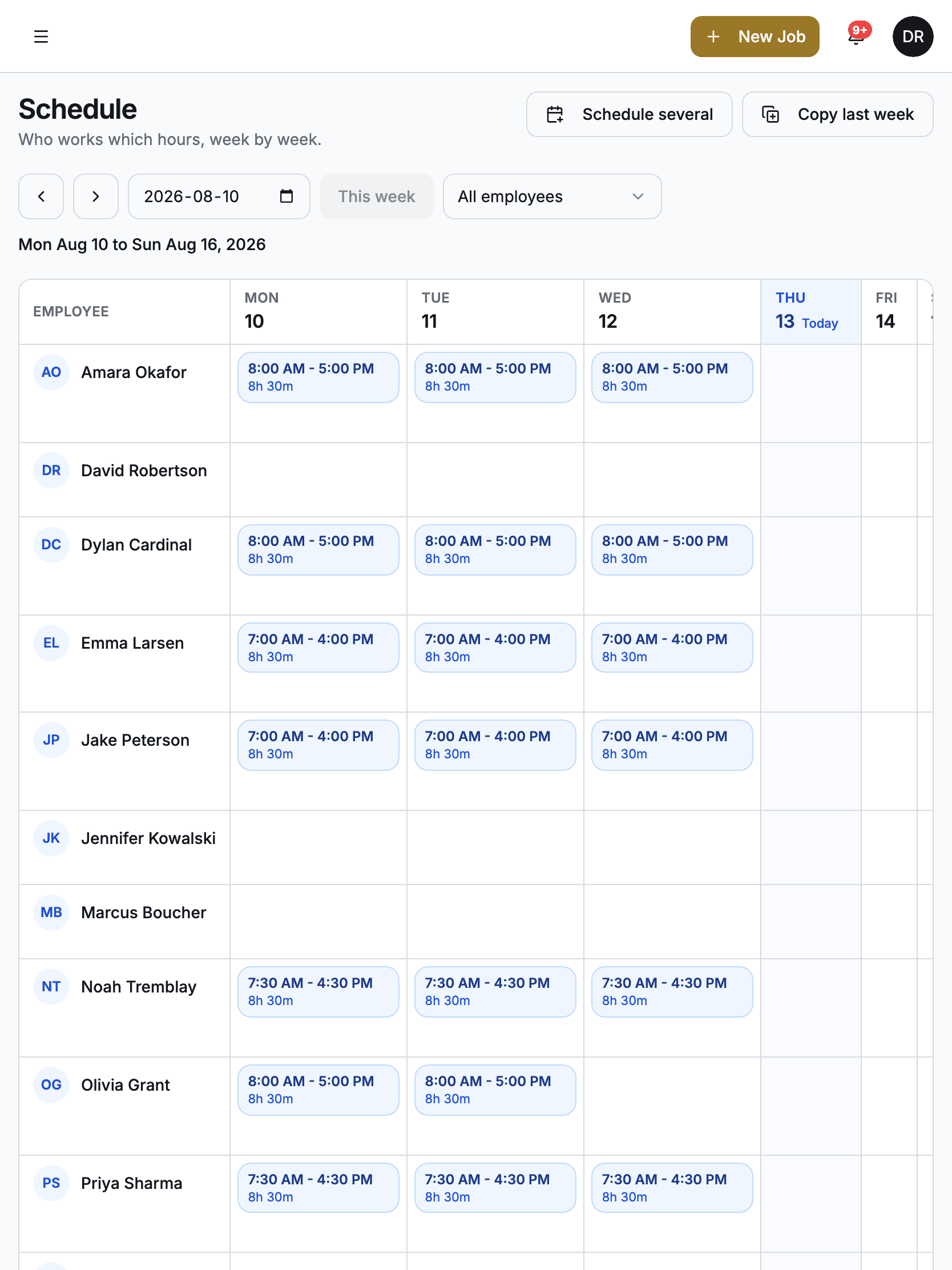
Build next week in one click
Lay out shifts for the whole crew, then copy last week forward when the routine holds. Recurring jobs repeat themselves; you only touch the exceptions.
- Week view for the whole crew, planned hours per person
- Copy last week, adjust what changed
- Recurring routes stop being a Sunday-night chore
Talk to the person who built it
No sales team, no ticket queue. Petr answers, usually the same business day.
Built for crews on routes
Any trade where a crew leaves in the morning, visits several sites, and someone has to invoice for it afterwards.
Landscaping
Recurring maintenance routes, per-visit invoicing, and crews that clock in at the site.
Snow removal
Storm-day dispatch from the job map, seasonal contracts billed monthly, overnight hours paid right.
Lawn care
Weekly mows on repeat, a route order that saves fuel, cards on file so nobody chases forty-five dollars.
Cleaning
Gate codes and access notes travel with the job; a photo closes every visit.
Window and pressure washing
Quotes that become jobs that become invoices, without retyping a thing.
Tree care
Crew scheduling around the weather, job value tracked from quote to payment.
Live today
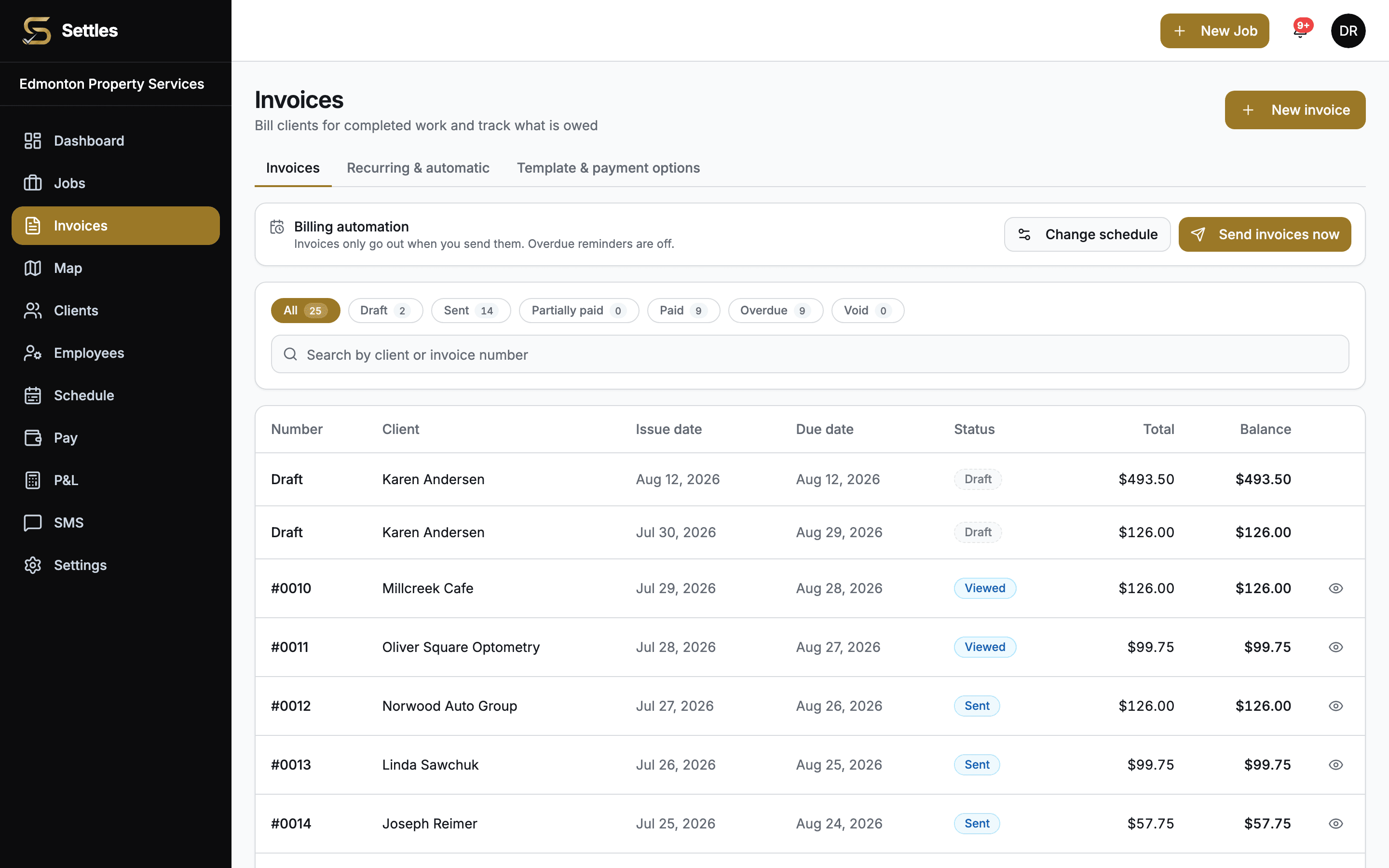
Invoicing and online payments
Finish the work, send the invoice, get paid. Completed jobs turn into invoices with the amounts filled in, clients tap a link and pay by card, and the books reconcile themselves. Overdue invoices get chased with automatic reminders on net 15, 30, or 60 terms.
- Pay-online button on every invoice
- Card payments land in your own Stripe account, on Stripe's payout schedule
- E-transfer, cheque, and cash recorded alongside card
- Automatic invoices on job completion or a monthly billing day
- Clients can save a card and be billed monthly, with your approval
Built for how the work really runs
Your crew doubles in winter. Your software bill should not.
Hire fifteen people for a storm season on a per-seat platform and the bill lands in the months cash is tightest, in US dollars. Settles is flat and Canadian, so the winter crew does not cost you a winter bill.
One more crew member
$4.95
a month, on Settles
The same person on Jobber
$40.39
a month, US$29
Which makes them
8x
dearer per head, verified 24 August 2026
Flat through the season
$4.95 to add a crew member for the winter, not $40. Remove them in spring and the bill comes back down on its own.
Canadian dollars, and e-transfer
No exchange-rate surprise on the invoice. Clients who pay by e-transfer are tracked and matched to the job, not left in a separate spreadsheet.
See the year, not the month
The cost calculator models your summer and winter headcount across twelve months, against every major competitor.
Honest, sourced comparisons
Pricing
Three plans. Getting paid is in all of them.
Prices in CAD, plus $4.95 a month for each employee on the account. Owners are free.
Base
For 1 to 3 person operations.
$79/month
- Clients, jobs, calendar and quotes
- Invoices, card payments, e-transfers and reminders
- Client portal, crew app and time clock
- Import from Jobber
Most popular
Pro
For crews that want the work to run itself.
$129/month
- Everything in Base
- Recurring jobs and monthly auto-invoicing
- Map and route order
- Quote follow-ups, review requests and win-back emails
- Card on file and autopay
- Pay (payroll numbers, CSV export)
- Client messaging and quotes by text
- 1,000 texts to clients a month
Elite
For bigger crews and sales teams.
$179/month
- Everything in Pro
- Your own texting number
- Two-way texting, and ask clients for photos by text
- Unlimited texts to clients
- Door-to-door sales, territories and leaderboard
- Live ops for several crews, and P&L
- Priority support, and we set you up and import your data
Plus $4.95 per employee, per month, on either plan
Every active employee on the account. Owners are free. Hire someone and it scales up, they leave and it scales down.
Card processing is handled by Stripe. The 2.9% + 30¢ is Stripe's standard Canadian card rate; Settles adds no markup on top.
FAQ
Honest answers to fair questions
The things contractors actually ask before they switch, answered without the hedging.
Is my company's data isolated from other companies?
Yes. Every company on Settles has its own isolated workspace, enforced at the database level with row-level security. Your jobs, clients, and pay data are never visible to anyone outside your company.
Does Settles move money or run payroll?
Settles never holds your money. When clients pay invoices by card, the payment goes straight into your own Stripe account and on to your bank. Payroll stays yours too: we track hours and calculate what you owe each employee, and you pay your team however you do today, with accurate numbers to work from.
Does it work on phones?
Yes. Settles is built mobile first. Crews clock in, work checklists, and attach photos from their phone in the browser, no app store download required. The office side works on any laptop or tablet.
How do my employees join?
You invite them by email from the team page. They accept the invite, set a password, and land in the crew view with their schedule and jobs. No per-seat setup calls, no IT project.
Can I import my data from Jobber or spreadsheets?
Yes. Upload or paste a CSV export from Jobber, Housecall Pro, or any spreadsheet and Settles matches the columns, previews every row, skips duplicates, and imports clients, service locations, and even jobs. Most crews are fully set up within an afternoon.
What does it cost?
Three plans, in Canadian dollars. Base is $79 a month, for 1 to 3 person operations: clients, jobs, quotes, invoicing, card payments and reminders. Pro is $129 a month and adds recurring jobs, monthly invoicing, the map, payroll numbers, autopay and quotes by text. Elite is $179 a month and adds your own texting number, two-way texting, unlimited texts, door-to-door sales, live ops, P&L and priority support. All are plus $4.95 a month for each employee on the account. Owners are not counted, and the employee count follows your roster: hire someone and it goes up, remove them and it goes down. Card processing is Stripe's standard 2.9% + 30 cents, with no markup from us.
Bring what you already have.
Start with the next job.
There is no implementation project. Put your clients in, invite the crew, and schedule the next job. Settles fills in as you use it.
- Import your clients from a spreadsheet
- Invite the crew with a link, no app store
- Turn on card payments whenever you are ready
Base $79, Pro $129 or Elite $179 a month in Canadian dollars, plus $4.95 per employee. Owners are free. Or look around the live demo first, or call 780-966-2120.